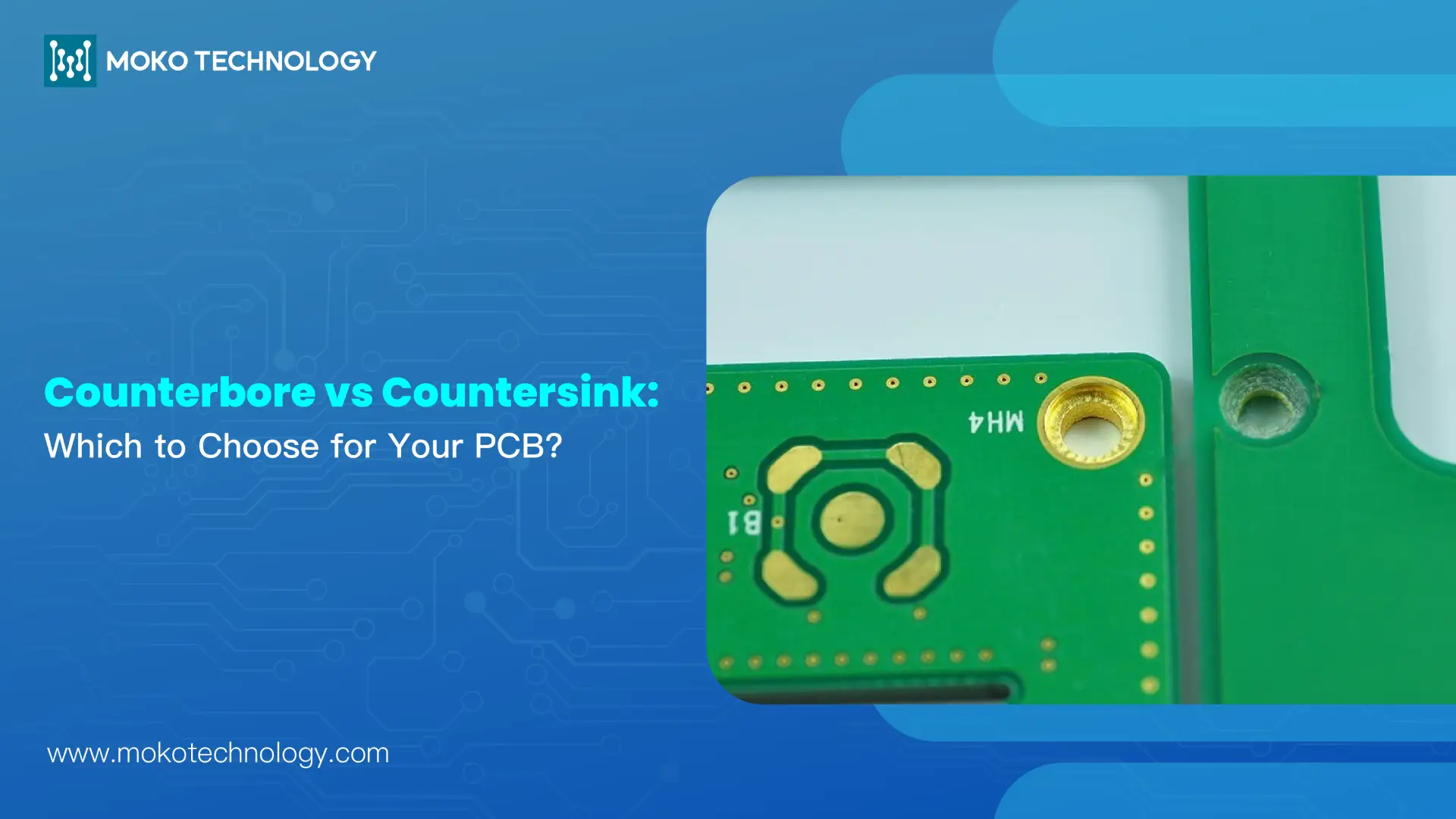
Counterbores and countersinks are both recessed holes that are used to accommodate fasteners in PCBs. Though they are designed with a similar intention, their shape and application are different. The counterbore forms a flat-bottomed cylindrical hole for socket-head screws, and the countersink forms a conical hole for flat-head screws. Choosing the wrong hole type could result in assembly issues, poor mechanical strength, or interference with other components. This blog will help you understand the key differences between counterbore holes and countersink holes, and how to choose the right one for your project.
Understanding Counterbore and Countersink
What Is a Counterbore Hole in PCB?
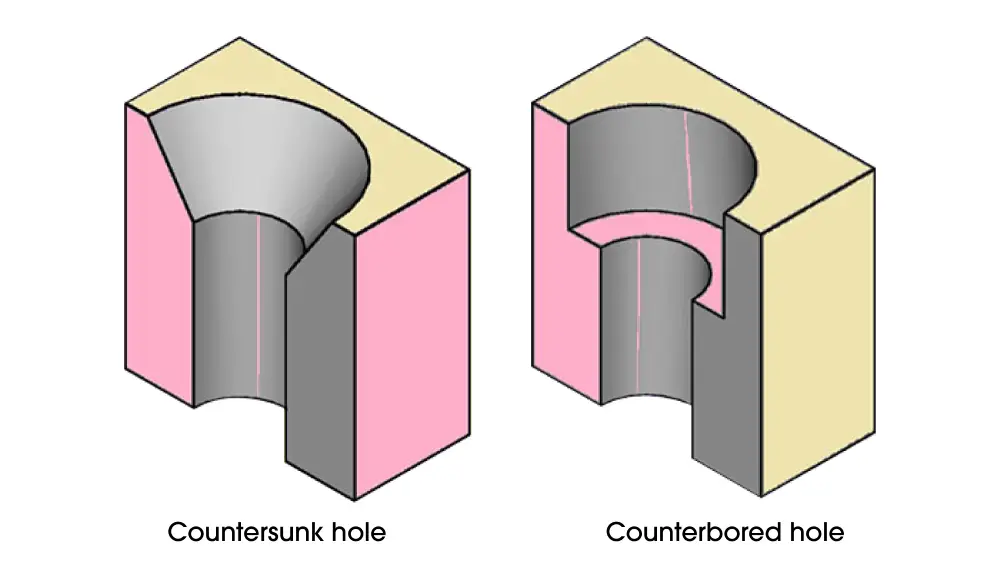
A counterbore hole is a cylindrical, flat-bottomed hole drilled into a PCB to let socket head cap screws or hex bolts reach a level that rests either at surface height or under the board surface. The hole exists with straight walls and a horizontal bottom surface which delivers its dimensions according to specific applications.
What Is a Countersink Hole in PCB?
Countersinks have a conical shape at the entrance, matching the angle of the underside of a flat-head screw. It’s designed to be either 82° or 90° for flush surface mounting. The tapered wall allows the screw head to seat smoothly and sit flush, resulting in a clean, flat surface profile on the exterior of the PCB.
Counterbore vs Countersink: 5 Critical Differences
Whilst counterbore and countersink holes are used for the same purpose of enabling a screw lies flush with the surface of the board, there are some distinctions in the functions and how they can be done.
- Shape: The main difference between counterbore and countersinking holes is their shapes. Counterbores feature a cylindrical shape with a flat bottom and countersinks have a conical formation.
- Hole Diameter: The diameter of the countersink hole usually ranges from 2mm to 5mm, while counterbores have a larger hole diameter, about 4mm to 10mm. The size difference is because the two hole types are designed to fit different screw types and sizes.
- Depth: Counterbore holes penetrate deeper than counters, which allows the screw to like flush below the surface of the board. The additional depth in counterbore holes creates largere space that enables complete recession of the entire screw head under the material surface.
- Drilling angle: The drilling angle for counterbore holes requires a straight downward direction without any angles involved. The creation of countersink holes includes specific angled drilling which matches flat-head screw head dimensions at either 82°, 90°, or 60° orientation.
- Strength properties: Compared to a counterbore, a countersink is stronger because over-tightening without a countersink can lead to wood splitting or structural damage. Countersink holes designed at a specific angle help distribute applied tension across materials and prevent material failures when fasteners receive tightenings.
Let’s explore the counterbore vs countersink comparison in the table below:
| Feature | Counterbore | Countersink |
| Shape | Cylindrical with flat bottom | Conical with angled walls |
| Bottom Surface | Flat (90° to hole axis) | Angled (typically 82°-90°) |
| Transition | Sharp, step-like | Gradual, tapered |
| Compatible Fasteners | Socket head screws, spacers | Flat head screws |
| Manufacturing Tool | End mill | Countersink bit |
| Depth Control | More critical | Less critical |
| Surface Profile | Component sits on flat platform | Component conforms to angled surface |
Application of Counterbore and Countersink
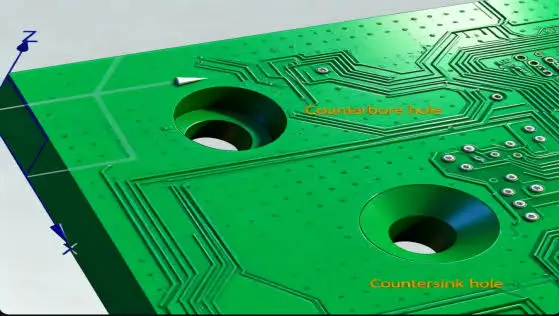
Countersink holes and counterbore holes are two different types of holes found in PCB designs, each designed to suit different types of fasteners and performance needs.
Typical Applications for Countersink Holes
- Consumer electronics: Typically used in smartphones, tablet computers, laptops and wearable devices where a thin, compact profile requires screws to sit flush with the PCB or enclosure.
- Medical and precision equipment: Used for medical devices, testing instruments, and other precision products that must have a smooth surface to avoid interference with nearby components or moving parts.
- PCB-to-enclosure mounting: Used to mount PCBs in enclosures that are compact enough to prohibit screw head protrusion, which may interfere with covers, batteries, displays and/or nearby components.
Common Uses of Counterbore Holes
- Industrial and automation equipment: They are frequently used in industrial controllers, robotics and machinery that require powerful mechanical fastening.
- Automotive and aerospace electronics: Counterbore holes are commonly found in PCBs subject to vibration, shock or repeated mechanical loads, or in applications where structural components need to be securely mounted.
- Mechanical support structures: Used to attach standoffs, spacers, brackets and other mechanical supports that need a flat surface to sit on for secure mounting.
Counterbore vs Countersink: Selecting the Right Hole Type for Your PCB
When selecting between counterbore and countersink, there are several key factors to be considered, including the fastener type, assembly requirements, and mechanical demands of your application. Below we provide some suggestions on which one to use for different scenarios:
Choose a Countersink When:
- You’re installing flat-head (countersunk) screws — the angle of the conical recess is the same as the angle of the screw head for a flush fit.
- Flush, unobstructed surface takes priority, for example in a compact enclosure or product in which the protruding screw head could cause a fit or handling problem.
- The mechanical loads are low to moderate and maximum clamping strength is not as important as flush mounting.
Choose a Counterbore When:
- You are working with socket-head cap screws, hex-head screws, bolts or assemblies with nuts and washers—the flat-bottomed recess provides fasteners with proper seating and even load-bearing contact.
- The fastener head needs to be recessed below the surface to provide clearance for tools or to avoid interference with the housing, heat sink, or adjacent components.
- Applications involving high mechanical loads or vibration, where a larger bearing surface helps distribute clamping force more evenly.
Conclusion
Knowing the difference between counterbore and countersink holes is critical when designing PCBs for appropriate component installation. The specific shapes of both counterbore and countersink holes enable them to serve as component recesses for distinct purposes. Choosing appropriate hole types and parameters can improve the PCB’s functionality, as well as the durability and performance of the product, while also reducing assembly problems during manufacturing and maintenance issues throughout the product’s lifecycle.
Frequently Asked Questions
1. When should I choose a countersunk hole over a counterbored hole?
If your PCB requires a smooth, flush surface, opt for a countersunk hole. If your project demands high shear resistance or must support heavy loads and vibration, a counterbored hole is the better choice.
2. Does adding countersink or counterbore holes increase PCB fabrication costs?
Yes, manufacturing countersink or counterbore holes would add cost, since both require secondary machining steps besides standard PCB drilling.
3. Can countersink or counterbore holes be added to an existing PCB design, or do they need to be planned from the start?
It’s better to plan them at the very beginning. But if you want to add them to an existing PCB design, it’s necessary to ensure that there is enough space around the hole, and distance from copper traces, vias, and components.
4. Can countersink and counterbore holes be used on the same PCB?
Yes, many PCB designs use both, depending on which fasteners are used in different mounting locations.
5. Does the PCB thickness limit whether a counterbore or countersink can be used?
Yes. A counterbore needs more room in the board because it has a flat-bottomed recess, and there still needs to be enough material left underneath it to keep the board strong. So if a PCB is very thin, it may not have enough depth for a counterbore, and a countersink might be the better option instead.